





A startup directory is a fundamental tool within the tech ecosystem, serving as a centralized, searchable list of new companies. These directories help investors source deals, job seekers find opportunities, and founders analyze competitors. They are curated databases that structure company information—such as industry, location, and funding stage—for easy filtering and discovery.
The most prestigious of these is the Y Combinator (YC) startup directory, a high-signal platform listing the thousands of companies that have completed the world-renowned accelerator program. This guide will show you how to navigate and leverage this powerful resource for investment research, job hunting, sales prospecting, and competitive analysis.
What is the YC Startup Directory?
The YC startup directory is the official public database of over 5,000 companies funded and mentored by the Y Combinator accelerator since 2005. It is a primary resource for venture capitalists, journalists, and sales teams to find and evaluate high-growth startups.
Inclusion in this directory is a powerful marker of quality and potential. The combined valuation of these companies exceeds $1 Trillion, underscoring its economic significance. The directory includes household names like Airbnb, Stripe, DoorDash, Coinbase, and Reddit, making it a living history of the last two decades of tech innovation.
Clarifying the "Windows Startup Directory" Confusion
The startup directory in Windows 10 or 11 is a system folder that launches programs on boot. This technical operating system function is entirely unrelated to business or company directories like Y Combinator's. To find the YC directory, navigate to ycombinator.com/companies in a web browser.
How to Navigate and Use the YC Startup Directory: A Step-by-Step Guide
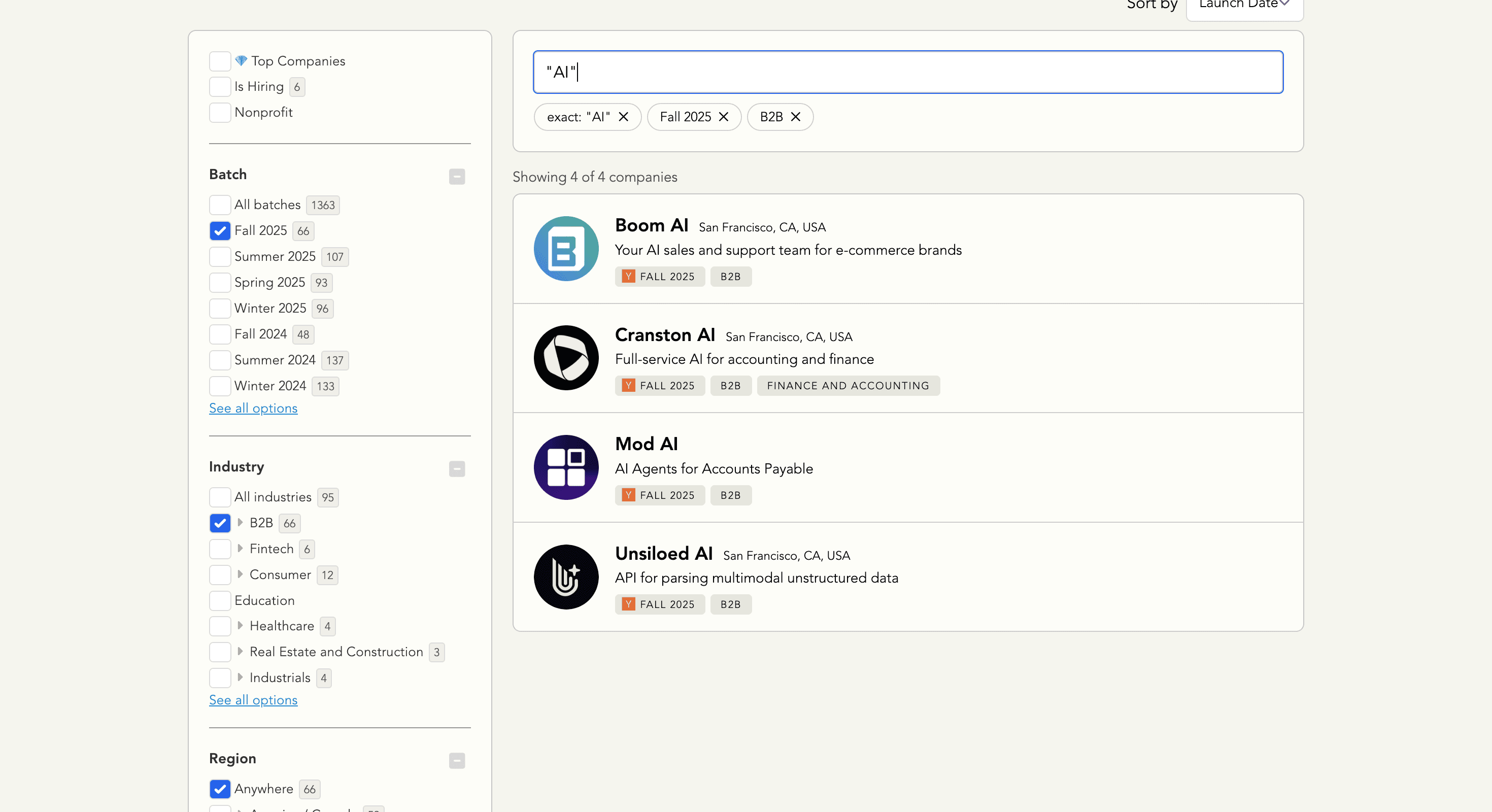
To effectively use the YC directory, start by applying broad filters like "Industry" or "HQ Region." You can then refine your search using the keyword search bar for specific terms. For targeted discovery, use special filters like "Is Hiring" for growing companies or sort by "Batch" for the newest startups.
Here is a practical workflow for navigating the directory:
- Start with Broad Filters: On the left-hand sidebar, select the primary criteria for your search. For example, choose
Fintechfrom the Industry list orAmerica / Canadafrom the HQ Region list. - Apply Secondary Filters: Layer on additional filters to narrow your results. You might add the
Is Hiringtag to see only growing companies or select the most recent Batch to find the newest startups. - Use the Search Bar for Precision: The search bar at the top is a powerful tool for finding niche companies. It searches company names and descriptions. Use it to look for specific keywords like
"API","LLM infrastructure", or"carbon capture". - Analyze Company Profiles: Click on any company to view its dedicated profile. This includes its one-line description, website link, founders, and batch.
- Sort for Curation: Use the "Sort by" options at the top. The
💎 Top Companiessort is YC's curated list of its most successful alumni, perfect for understanding what massive success looks like.
Source: datablist.com
Mastering the Directory Filters
The directory's immense power lies in its structured data and versatile filtering capabilities. Understanding each filter allows you to perform highly targeted searches.
- 💎 Top Companies: This is YC's hall of fame, featuring its most successful alumni. It’s a quick way to find breakout successes and study market-defining companies.
- Is Hiring: This simple checkbox is a powerful growth signal. Investors use it as a proxy for which companies are successfully deploying capital, and job seekers use it to find active opportunities.
- Batch: The specific accelerator cohort a company belongs to (e.g., W27, S26). Investors filter by the latest batches to find new deals, while market researchers track batches to spot emerging trends.
- Industry: These broad categories are the primary method of discovery. A Fintech-focused VC will live in the Fintech filter, while a SaaS investor will start with B2B. Choosing the right industry tags is paramount for being found.
- HQ Region: Crucial for investors with a geographic focus or founders looking for regional partners. The rise of the Remote tag also reflects the major shift in how modern startups are built.
- Company Size: This slider for employee count is a direct indicator of a company's stage. Angel investors might target 1-10 employees, while sales teams for [Link to: human resources] software might target the 11-50 range.
Using the Directory for Specific Goals
Different professionals use the YC directory for unique strategic advantages. Here’s how to tailor it to your needs.
Source: datablist.com
For Investment Research
Venture capital analysts use the directory as a primary source for deal flow.
- Workflow: Filter by the two most recent Batches and your target Industry (e.g.,
Healthcare). - Analysis: Look for companies with strong founder-market fit (e.g., founders with previous experience in the field) and clear, concise one-liners that address a large market. The presence of a
Public Application Videocan provide deeper insight into the team's thinking.
For Finding Job Opportunities
The directory is a goldmine for finding jobs at high-growth, early-stage companies.
- Workflow: Check the Is Hiring box and filter by your preferred Industry or HQ Region. You can also use the search bar for roles like
"engineer"or"product manager". - Analysis: Target companies in the 11-50 or 51-200 Company Size range, as they are often scaling rapidly and offer significant impact opportunities. A recent batch year indicates the company is well-funded and likely to be hiring across multiple roles.
For Sales Prospecting and Lead Generation
B2B sales teams see the directory as a curated list of well-funded future customers.
- Workflow: Filter by an Industry that aligns with your ideal customer profile (e.g.,
B2B). Use the Company Size filter to match your target segment. - Analysis: Many teams use tools to [Link to: scrape data] from the directory to build lead lists. A company's one-liner often reveals the technology they might need. For example, a company describing itself as a "developer tool for APIs" is a prime lead for cloud infrastructure or security products.
For Competitive Analysis
Founders use the directory to map their competitive landscape and refine their positioning.
- Workflow: Filter by your primary Industry and the last 4-6 Batches to identify emerging competitors.
- Analysis: Study their one-liners, industry tags, and descriptions. Are they positioning themselves for enterprises or SMBs? Are they using keywords like "AI" or "automation"? This intelligence helps you differentiate your value proposition.