






What Launched Today

How to Use the YC Startup Directory for Competitive Analysis & Market Research

Published on June 22, 2026

Learn how to use the YC Startup Directory for powerful competitive analysis, market research, and trend spotting. Master filters to find competitors & leads.

How to Use the YC Startup Directory for Competitive Analysis & Market Research

What Is the YC Startup Directory and Why Is It So Valuable?

The YC Startup Directory is a public, searchable database of over 5,000 companies funded by the Y Combinator accelerator. Founders, investors, and sales teams use it for competitive intelligence, market research, lead generation, and discovering emerging industry trends.

The Y Combinator Startup Directory is one of the most valuable free resources in the tech ecosystem. Since 2005, Y Combinator (YC) has invested in a vast and influential portfolio of companies, including household names like Airbnb, Stripe, and DoorDash, with a combined valuation exceeding $1 trillion. This public directory is not just a list; it's a living archive of startup ideas, founder ambitions, and market validation signals, updated with every new batch.

For anyone in the startup world—founders, investors, job seekers, or sales professionals—mastering this directory is a critical skill. It provides a direct line of sight into the competitive landscape, allows you to validate ideas by seeing who has been funded to try something similar, and helps you understand the micro-trends YC is betting on. It offers a structured, first-party dataset without the significant cost of premium intelligence tools like PitchBook or Crunchbase Pro.

Use Case Who It's For Key Outcome Example Question Answered
Competitive Intelligence Startup Founders A clear map of direct and indirect competitors, their messaging, and market positioning. "Who else is building an AI-powered code review tool, and how do they describe their value proposition?"
Market Research Founders, VCs, Strategists Identification of emerging technology trends, validated market needs, and potential ecosystem gaps. "Is YC funding more companies in climate tech or developer tools in the last two years?"
Lead Generation Sales & BD Teams A targeted list of recently funded companies that are growing and likely have a budget for new tools. "Which B2B SaaS companies in the W26 batch have between 10-50 employees?"
Deal Sourcing Angel Investors, VCs A pipeline of promising, pre-vetted startups to track before they begin a formal fundraising roadshow. "Show me all FinTech companies from the latest batch that are headquartered in Europe."
Recruitment & Job Seeking Job Seekers, Recruiters A curated list of high-growth, hiring startups, bypassing the noise of generic job boards. "Which YC-backed remote companies with under 100 employees are currently hiring?"

Navigating the Directory: First Steps & Key Features

You can access the YC Startup Directory for free at ycombinator.com/companies. The interface features an infinite scroll feed of companies and a powerful filter sidebar on the left for navigating and sorting the database.

Getting started requires no special tools or logins. When you land on the page, you see a continuous feed of companies. Each card provides a snapshot: its logo, name, a one-liner describing its mission, and tags for its batch and industry.

The real power is unlocked by the filter and sort sidebar on the left. This is your command center for refining the entire 5,000+ company database into a manageable list.
A collage showing the Y Combinator logo and various startup logos from its directory.
Source: datablist.com

At the top of the sidebar, you'll find a few high-value, pre-packaged filters:

  • 💎 Top Companies: A curated list of YC's most successful and highest-valuation companies. Use this to study the characteristics of breakout successes.
  • Is Hiring: A dynamic, real-time filter that shows only the portfolio companies that have indicated they are actively recruiting. This is a goldmine for job seekers.
  • Nonprofit: YC also funds non-profit organizations. This filter isolates the mission-driven organizations in the portfolio.

Mastering Filters to Pinpoint Relevant Startups

To discover relevant startups, use the directory's left-hand sidebar to filter by Batch, Industry, HQ Region, and Company Size. Combining these filters allows you to create highly specific lists for analysis, such as "B2B SaaS companies from the W26 batch."

Effective filtering transforms a noisy, overwhelming list into a focused, strategic asset. Let's break down each filter.

Filter by Batch

Every company is tagged with its accelerator batch, such as "W26" (Winter 2026) or "S25" (Summer 2025). This is a proxy for market sentiment at a specific point in time.

  • For Recent Trends: Filter for the last 2-3 batches (e.g., W26, S25, W25) to see what's getting funded right now.
  • For Historical Analysis: Filter for batches from 5-10 years ago (e.g., W19, S18) to see which ideas stood the test of time and which were fads.

Filter by Industry

The industry filters are broad but serve as an excellent first layer of segmentation. Common categories include:

  • B2B
  • Fintech
  • Consumer
  • Healthcare
  • Developer Tools
  • Climate

Pro Tip: Combine a broad industry filter with a keyword search for greater specificity. For example, to find companies working on AI for legal teams, filter by Industry: B2B and then use the main search bar for the keyword "legal".
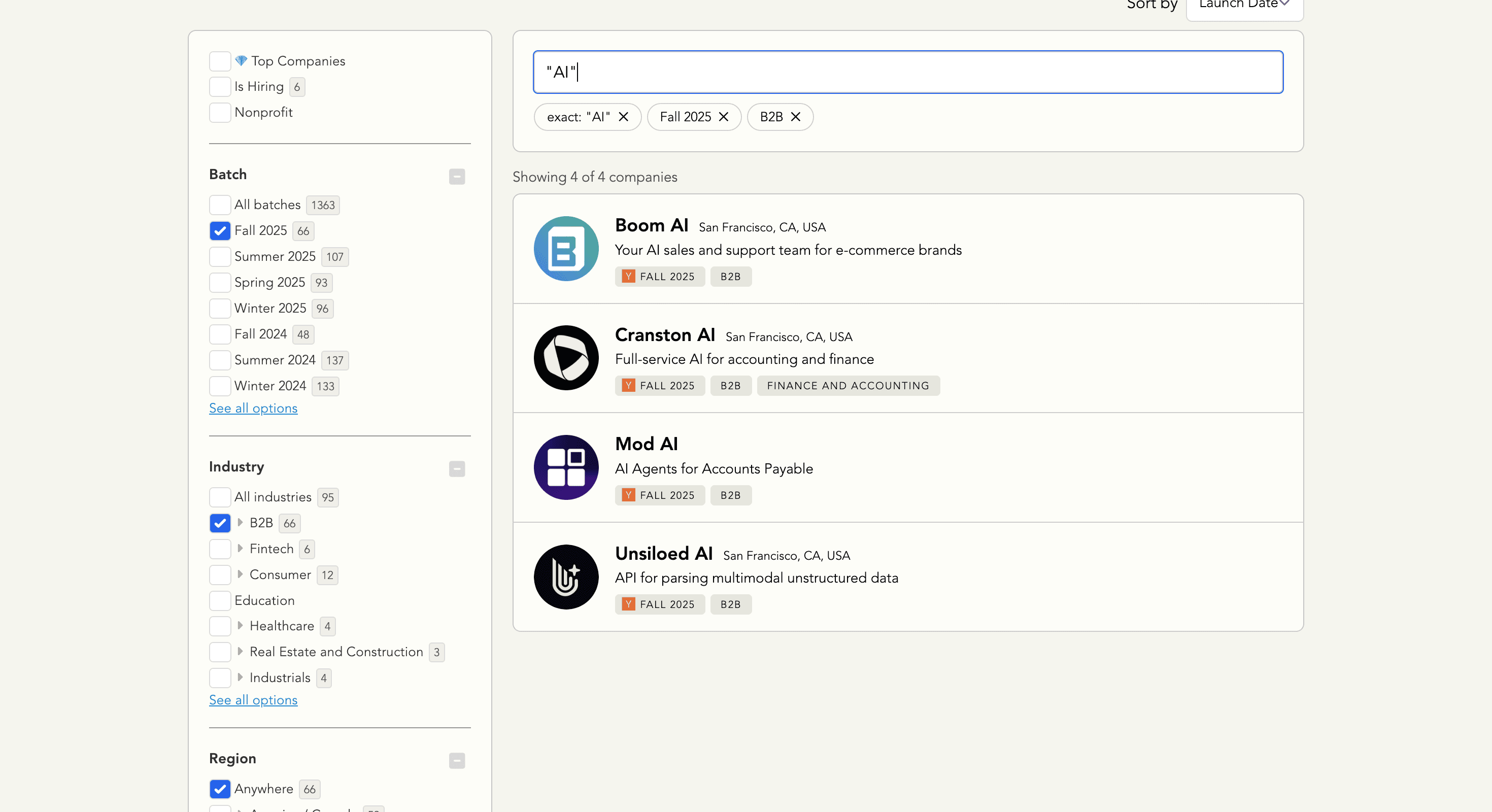
Screenshot of the Y Combinator Startup Directory interface, showing the filter sidebar and a list of companies.
Source: datablist.com

Filter by HQ Region

While many startups are remote, their headquarters can indicate their primary market focus or talent pool. You can filter by continent, country, or select "Remote."

  • Regional Market Analysis: If you're launching in India, filtering for South Asia > India instantly reveals local YC-backed competitors.
  • Sales Territory Planning: A sales leader can filter by America / Canada or Europe to create prospect lists for regional teams.

Filter by Company Size

This simple employee count slider (1-1,000+) is a powerful tool for competitive benchmarking and lead qualification.

  • For Peer Benchmarking: If you are a 15-person company, filtering for startups in the 10-25 employee range provides a list of true peers.
  • For Sales Prospecting: A company selling HR software might target startups in the 50-150 employee range, when they typically formalize HR functions.

Use Special Toggles and Keyword Search

Beyond the main categories, several checkboxes provide deeper qualitative data, offering a look inside the founders' original pitch:

  • Public Application Video: See the raw, early-stage pitch the founders used to get into YC.
  • Public Demo Day Video: Watch their polished, 2-minute pitch delivered to investors.
  • Has Application Answers: Read the founders' actual written answers to the YC application questions.

Analyzing these materials is like finding the "director's cut" of a company's story, allowing you to deconstruct how successful founders frame their problem, solution, and vision from day one.

How to Conduct Deep Competitive Analysis

To conduct a deep competitive analysis, first create a filtered list of 5-10 competitors from the YC directory. Then, deconstruct their individual profiles to capture their messaging and value proposition before mapping this data in a competitive matrix.

Once you have a targeted list, the real work begins.

1. Deconstruct Competitor Profiles

Click on any company to open its detailed profile page. In a spreadsheet, capture the following for each competitor:

  • One-Liner: Their most distilled value proposition. How do they communicate their core benefit in under 15 words?
  • Description: The longer paragraph explaining the problem, target customer, and solution.
  • Founders: Who are they? Check their professional profiles to assess their "founder-market fit." Did they experience the problem they're solving firsthand?
  • Batch: This tells you their time-in-market. A company from W17 has had years to build, while one from S25 is just starting.

2. Analyze Competitor Websites and Messaging

The YC profile is the "what"; their website is the "how." A startup's homepage is its most important sales pitch. Look for:

  • Hero Section Clarity: Does the headline clearly state the primary benefit in under five seconds?
  • Social Proof: Look for customer logos, testimonials, case studies, or industry awards.
  • Call-to-Action (CTA): What do they want you to do? "Request a Demo," "Start Free Trial," or "Contact Sales"? This reveals their go-to-market motion.

3. Create a Competitive Matrix

Consolidate your findings into a simple spreadsheet. This visual map makes it easy to spot patterns and identify your unique differentiators.

Company Name One-Liner Target Audience Key Differentiator Pricing Model Founder-Market Fit Social Proof Used
Linear (W19) The issue tracking tool you'll enjoy using. High-performance software teams Speed, keyboard-first UX, design aesthetic Per user/month, tiered Ex-Airbnb/Coinbase engineers Vercel, Retool, Ramp logos
Supabase (S20) The open-source Firebase alternative. Developers building applications Open-source, no vendor lock-in Freemium, usage-based scaling Ex-Microsoft/AWS engineers GitHub stars, community contributors
Your Startup [Your one-liner here] [Your specific audience here] [Your unique angle here] [Your planned model here] [Your team's unique expertise] [Your planned proof points]

Using the Directory for Market Research & Trend Spotting

Use the directory for market research by analyzing batch compositions over time to spot macro trends. You can also identify micro-trends by combining broad industry filters with specific keyword searches to validate or invalidate your startup idea.

Spotting Macro Trends

This analysis reveals the major currents of technological change.

  1. Filter for a recent batch (e.g., W26).
  2. Tally the number of companies in the top industry categories (B2B, AI, Fintech).
  3. Repeat the process for a batch from five years ago (e.g., W21).
  4. Compare the results. You'll likely see a dramatic spike in categories like "AI" and "Climate," providing hard data on shifting market priorities and what's currently trending.

Spotting Micro-Trends

Micro-trends are where new opportunities lie. For example, within "AI," recent batches show a trend towards "AI agents for back-office automation." To find these, filter by a broad industry like B2B and then use the search bar for niche terms like "automation," "compliance," or "supply chain." A cluster of 3-5 new companies tackling the same specific problem signals an emerging market for new AI tools.

Validating Your Startup Idea

The YC directory is a fantastic acid test for any new idea. Perform a keyword search for your concept:

  • Zero Results: Either a brilliant, untapped market or a "graveyard" where others have failed silently. Time for intense customer discovery.
  • A Few Recent Results (2-5): Often the sweet spot. The market is validated by YC's investment but isn't saturated.
  • Many Results (Including "Dead" Companies): A highly competitive market. Research the "dead" companies (inactive websites) to learn from their mistakes. The Wayback Machine can show you their old pitch.

Actionable Strategies for Sales, Fundraising, and Job Hunting

For advanced use cases, sales teams can filter for recent batches to find newly funded prospects. Founders can use the directory to find social proof for their market, and job seekers can use the "Is Hiring" filter to find vetted, high-growth opportunities.

For Sales and Business Development

YC companies that graduated in the last 6-18 months are prime sales targets. They have fresh capital and need tools to scale.

  1. Filter by the last 2-3 batches.
  2. Add an industry filter that matches your Ideal Customer Profile (ICP), e.g., "Fintech."
  3. Add a company size filter, e.g., "2-20 employees."
  4. Use this list to personalize your outreach. A message that starts with, "Hi [Founder], congrats on the S25 launch! I saw you're tackling [problem from their one-liner]..." will always outperform a generic template, which is something a modern modern sales OS can help manage.

For Founders Seeking Funding

When you pitch an investor, being able to say, "YC has funded three other companies in the 'AI for supply chain' space in the last year, which validates the market's timing," is an incredibly powerful statement. Use the directory to build a "Market Validation" or "Why Now?" slide for your pitch deck.

For Job Seekers

The "Is Hiring" filter is the most direct path to a new role in tech. It's a curated list of companies that have passed one of the most rigorous vetting processes in the world. Combine it with industry and location filters to find your perfect match, bypassing the noise of generic job boards and even some specialized options like a cohire job platform.

How to Export Data from the YC Startup Directory

The YC Startup Directory is designed for browsing, not for bulk data export, and does not offer a native "Download CSV" feature. To create lists for analysis or outreach, you need to use third-party no-code scraping tools to automate the data extraction process.

These tools can be configured to visit each company profile on your filtered list and pull structured data like the company description, batch, tags, and profile URL into a spreadsheet.

Tool Detail Takeaway
Browse.ai Pre-built and custom scraping "robots". Can be trained to extract all fields from list and detail pages. Requires some setup.
Datablist AI-powered data platform with web scraping. Uses AI agents and templates to scrape with plain English commands. Less technical setup.

When using such tools, always be mindful of the website's terms of service and scrape responsibly.

YC Directory vs. Alternatives

The YC Directory is a free, first-party source for the YC ecosystem, making it highly accurate for that dataset. Alternatives like Crunchbase offer broader fundraising history, while PitchBook provides deep private market financial data for enterprise clients.

Criteria Y Combinator Directory Crunchbase
Scope YC-funded companies only (~5,000+) Broad database of millions of companies
Cost 100% Free Freemium, with Pro plans
Data Focus Company description, batch, founders Detailed funding rounds, investors, acquisitions
Qualitative Data High (application answers, demo day videos) Low (focus on quantitative funding data)
Primary Use Case YC ecosystem analysis, early-stage prospecting Tracking funding events, M&A signals
Accuracy Very High (first-party data) Generally high, but relies on some self-reporting

For analyzing the YC ecosystem, the directory is the best starting point. To understand the full funding history of a competitor, complement it with a tool like Crunchbase.

Frequently Asked Questions (FAQ)

What is the difference between the YC Startup Directory and the startup directory in Windows 10/11?

The YC Startup Directory is a website listing businesses funded by Y Combinator. In contrast, the "startup directory" in Windows 10 or 11 is a system folder on your computer containing shortcuts to applications that launch automatically when you boot your PC. These two are completely unrelated.

How often is the YC Directory updated?

The YC directory is updated after each new batch of companies completes the program, typically twice a year around Demo Day. Minor updates to existing company profiles occur on an ongoing basis.

Can I find founder contact information in the directory?

No, the official YC Startup Directory does not provide direct founder contact information like email addresses or phone numbers. You must use the company's website or professional networking platforms like LinkedIn to find this information.

How accurate is the information in the YC Directory?

The information is highly accurate as it is first-party data submitted directly by YC and the startup founders themselves. However, details like company size or hiring status can change quickly and may not always be perfectly up-to-date.

Is there a YC Startup Directory for specific niches like AI or FinTech?

Yes, you can create a niche ai startup directory or fintech list by using the "Industry" filter combined with the keyword search bar. For example, filtering by "Healthcare" and searching for "AI" will show all YC startups at that intersection.

How can I get my company into the startup directory yc?

The only way to be officially listed in the YC Startup Directory is to be accepted into and funded by the Y Combinator accelerator program. It is a curated list of portfolio companies, not a public submission platform.

How can I find YC startups in a specific city, like Bangalore?

You can find startups in a specific city by using the "HQ Region" filter. First, select the broader region (e.g., "South Asia"), and a secondary dropdown will appear, allowing you to select the country (e.g., "India"). While the directory doesn't filter by city, individual company profiles often list their headquarters city.