






Crunchbase Pro is a highly worthwhile investment for founders who are actively fundraising, conducting in-depth market research, or building a scalable B2B sales pipeline. Its core value lies in aggregating vast amounts of scattered private company data into a single, searchable startup database, saving founders dozens, if not hundreds, of hours of manual research. However, for early-stage or bootstrapped startups that only need occasional data lookups, its cost can be difficult to justify.
The decision to subscribe hinges entirely on your startup's current stage and most pressing goals.
- For founders in the pre-seed or ideation phase: The cost is likely prohibitive, and free resources such as the YC Startup Directory, AngelList, and LinkedIn are often more than sufficient for initial exploration.
- For founders actively preparing for a Seed or Series A round: Crunchbase Pro becomes a mission-critical tool. The ability to build targeted investor lists, analyze their portfolios, and identify warm connection paths provides a significant strategic advantage.
- For growth-stage B2B companies: The platform transitions from a fundraising tool to a powerful lead generation engine, enabling sales and marketing teams to identify companies with fresh funding that are ready to buy.
Ultimately, Crunchbase Pro is a powerful intelligence tool, not an automated fundraising or sales platform. Its value is directly proportional to the effort you put into it. Without a clear process for leveraging its data, a subscription can quickly become an underutilized expense.
What Key Problems Does Crunchbase Pro Solve for Founders?
For founders, Crunchbase Pro primarily solves the critical problem of inefficient and fragmented information gathering by providing a centralized, structured platform for investor prospecting, competitive analysis, and market intelligence. In the chaotic startup ecosystem, timely and accurate data is a competitive advantage. Crunchbase aims to be the single source of truth that replaces hours of sifting through press releases, news articles, LinkedIn profiles, and disparate company websites.
This centralized intelligence supports several critical functions essential to a startup's survival and growth:
- Investor Prospecting & Fundraising: This is arguably the most common use case for founders. The platform helps you move beyond generic "top VC" lists to identify investors who have a demonstrated history of investing in your specific industry, business model, stage, and geography. You can analyze an investor's portfolio to find potential conflicts, identify portfolio companies you can network with for a warm introduction, and see which investors are most active in leading rounds versus following on. This data transforms a "spray and pray" outreach strategy into a targeted, surgical approach.
- Competitive & Market Analysis: Understanding your competitive landscape is not a one-time task; it's an ongoing process. With Crunchbase Pro, founders can set up real-time alerts to track competitors' funding announcements, key leadership changes (e.g., hiring a new VP of Sales), and significant press mentions. This acts as an early warning system, allowing for proactive strategy adjustments. Beyond individual competitors, the platform's data can reveal broader market trends—such as which sectors are attracting the most capital or what the average seed round size is in your industry. This helps you benchmark your own company's progress and set realistic fundraising goals, including managing your burn rate. The proprietary CB Rank also serves as a quick proxy for a company's momentum in the market.
- Lead Generation & Partnerships: For B2B startups, Crunchbase Pro is a potent tool for building highly targeted lists of potential customers. A funding announcement is one of the strongest buying signals a company can emit. A newly funded startup has both a fresh budget and an urgent need to build out its infrastructure and scale its operations. You can filter companies by firmographics like employee count, location, industry, and even their technology stack. This allows you to create precise lead lists, such as "US-based FinTech companies with 50-200 employees that just raised a Series B," which can be exported and used to fuel your sales pipeline. The same search capabilities can be used to identify potential strategic partners or even future acquisition targets.
| Function | Data Point Leveraged | Strategic Outcome |
|---|---|---|
| Investor Prospecting | Funding History, Lead Investors, Portfolio Companies, Investor Keywords | A highly targeted and prioritized list of relevant investors, increasing the odds of securing a meeting. |
| Competitive Analysis | News, Funding Alerts, Employee Growth Signals, CB Rank | Proactive adjustments to product and GTM strategy based on competitor momentum and market shifts. |
| B2B Lead Generation | Recent Funding, Industry, Location, Tech Stack, Growth Signals | A qualified pipeline of companies with the validated budget and immediate need for your product or service. |
How Can Founders Use Crunchbase Pro to Find Investors?
Founders can use Crunchbase Pro to find investors by executing a systematic, multi-stage workflow that leverages its advanced search filters to build, qualify, and prioritize a target list, transforming fundraising from guesswork into a data-driven process. The platform provides the raw materials and tools; the founder's job is to run the factory.
A successful investor prospecting workflow in Crunchbase Pro involves three distinct stages:
1. Building Your Initial Long-List
This stage is about casting a wide but relevant net to capture all potential leads. The goal is quantity of quality.
- Use Advanced Search: This is the heart of Crunchbase Pro. Combine multiple filters to hone in on your ideal investor profile. For example, a founder of a pre-seed AI startup could use the following filter combination:
- Investor Type:
Angel Group,Micro-VC,Venture Capital - Investments:
Artificial Intelligence(as an industry) - Number of Investments:
11-50(to filter for active but not overly-saturated investors) - Investment Stage:
Pre-Seed,Seed - Location:
United States,United Kingdom - Search by Lookalike Companies: This is a powerful, underutilized strategy. Identify 3-5 successful companies that are similar to yours (in a parallel industry or with a similar business model) but are not direct competitors. Pull up their Crunchbase profiles and look at their "Investors" tab. This gives you a pre-vetted list of investors who already understand your space and have a proven appetite for it.
- Use Keywords: Go beyond broad industry categories. Use the "Keywords" filter to search for specific terms in company and investor descriptions, like "generative AI," "supply chain logistics," or "PLG" (Product-Led Growth). This helps you find specialists who have explicitly stated an interest in your niche.
- Create Saved Searches & Alerts: Don't just run a search once. Save your complex queries (e.g., "Investors who made their first FinTech investment in the last 12 months") and set up daily or weekly email alerts. This turns Crunchbase into a passive intelligence engine, bringing new, relevant investors directly to your inbox as they emerge.
2. Qualifying and Prioritizing Your List
Once you have a raw list of 100-300 investors, the next step is to rigorously vet and rank them. This is where manual analysis is crucial.
- Portfolio Analysis for Conflicts & Synergy: Review each investor's current portfolio in detail. The most important check is for direct competitors—investing in one is an automatic disqualification for nearly all VCs. But go deeper: look for synergies. Do they have portfolio companies that could be future customers or partners? Does their portfolio show deep expertise in your go-to-market motion (e.g., enterprise sales vs. self-serve SaaS)?
- Analyze Investment Cadence and Role: Look at an investor's recent activity. Are they actively deploying capital, or has it been a while since their last investment? Critically, determine if they typically lead rounds or prefer to follow other investors. If you need a lead investor to set the terms for your round, you must prioritize those with a history of leading.
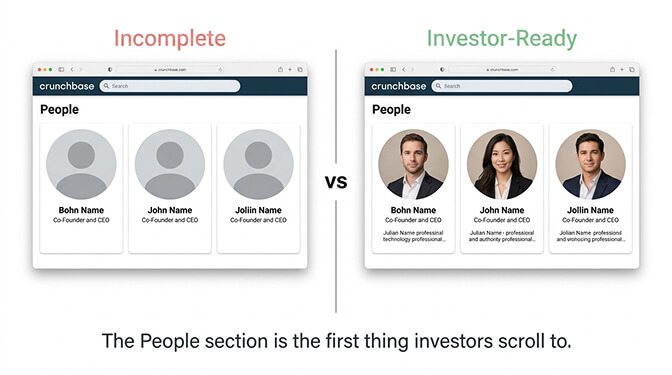
- Identify the Right Partner: An investment decision is made by a person, not a firm. Dive into the "People" tab for a venture firm. Identify the specific partners or principals whose bios, LinkedIn profiles, or past investments align with your startup's sector. Pitching the right partner at a firm can make all the difference. While Crunchbase often lacks direct contact info, knowing who to target is half the battle.
Source: headshotphoto.io
3. Executing the Outreach Workflow
With a prioritized list, you can move to execution.
- Segment Your List: Group your final list of investors into Tiers (e.g., Tier 1: perfect fit, high priority; Tier 2: good fit; Tier 3: potential fit).
- Export: Use the CSV export feature in Crunchbase Pro to move your final, prioritized list into a spreadsheet or your CRM.
- Enrich & Find Introductions: This is where you supplement Crunchbase data. Use tools like LinkedIn Sales Navigator or Apollo.io to find the direct contact information for your target partners. More importantly, use LinkedIn to search for "warm" introductions—a shared connection who can vouch for you is exponentially more effective than a cold email.
- Personalize Outreach: Use the data you gathered from Crunchbase to personalize your outreach. Reference a specific portfolio company they invested in or mention how your startup aligns with their stated investment thesis.
This methodical approach ensures every email you send is well-researched and has the highest probability of getting a response.
What Do You Get with a Crunchbase Pro Subscription (and What Does It Cost)?
A Crunchbase Pro subscription unlocks the platform's core value proposition: advanced search, data exports, and automated tracking, with pricing set at $49 per month when billed annually ($588/year) or a more flexible $99 on a monthly basis. The "Pro" tier is specifically designed for individual users like founders, salespeople, and researchers who need to move beyond simple, one-off lookups and into systematic data analysis.
The free version of Crunchbase is essentially a digital phonebook; you can look up basic company profiles, but your ability to search, filter, and analyze the data at scale is severely restricted. Crunchbase Pro transforms the platform from a simple directory into a dynamic market intelligence tool.

Source: easyvc.ai
Here’s a detailed breakdown of the key differences:
| Feature | Crunchbase (Free) | Crunchbase Pro (Individual) |
|---|---|---|
| Price | $0 | $49/month (billed annually at $588) or $99/month |
| Company Profile Access | Basic data points, some information is blurred or hidden | Full, unrestricted access to all data fields (funding rounds, investors, valuations, leadership, etc.) |
| Advanced Search | No access to advanced filters (can only search by name) | Full access to dozens of filters (funding stage, location, industry, CB Rank, employee count, keywords, investor type, etc.) |
| Data Exports | Not available | Yes, up to 2,000 rows per month to a CSV file for offline analysis. |
| Saved Lists & Alerts | Not available | Yes, create unlimited lists to track companies and set email alerts for key events like funding or acquisitions. |
| AI-Powered Insights | Not available | Yes, access to "Growth" and "Heat" Scores to identify trending companies and signals of momentum. |
| CRM Integration | Not available | Requires a higher-tier plan (Business). |
| Verified Contact Data | Not available | Limited access, often requires purchasing extra credits. |
Practical Tip for Founders: Before purchasing, always check for discounts. Many startup accelerators, incubators, and service providers (like AWS Activate or Stripe Atlas) offer deals or credits for a Crunchbase Pro subscription.
Beyond the Pro plan, Crunchbase offers higher tiers aimed at larger teams and enterprises:
- Crunchbase Business: Aimed at sales or research teams, this plan increases export limits to 5,000 rows/month, adds native CRM integrations (Salesforce), and includes more advanced predictive insights and AI-powered trend analysis. It costs approximately $199/user/month, billed annually.
- Crunchbase Enterprise: This is a custom plan that provides full programmatic access to the platform's data via the Crunchbase API. It's designed for organizations that want to integrate Crunchbase data directly into their own applications, business intelligence tools, or data warehouses for large-scale analysis. Pricing is customized based on usage and data requirements.
For a solo founder, Crunchbase Pro is the intended and most appropriate tier.
Pros and Cons of Crunchbase Pro for Founders
For a quick evaluation, here's a summary of the primary benefits and drawbacks from a founder's perspective.
| Pros | Cons |
|---|---|
| Unparalleled Data Aggregation: Saves hundreds of hours by centralizing company, funding, and investor data. | Significant Annual Cost: The ~$588 annual fee can be prohibitive for early-stage or bootstrapped startups. |
| Powerful Investor Prospecting: Advanced filters allow for building highly specific and relevant investor lists. | Inconsistent Data Accuracy: Crowdsourced data means key information can be outdated and requires verification. |
| Real-Time Competitive Intelligence: Automated alerts on competitors' funding and news provide a strategic edge. | Aggressive Billing Practices: The free trial's auto-conversion to a non-refundable annual plan is a common complaint. |
| Effective B2B Lead Generation: Funding announcements serve as powerful buying signals for identifying qualified leads. | Unresponsive Customer Support: Users frequently report difficulty getting timely help with billing or data issues. |
| Market Trend Analysis: Helps founders benchmark their startup against industry averages and spot emerging trends. | Requires Heavy Manual Effort: It's a research tool, not an automated outreach platform; value depends on user effort. |